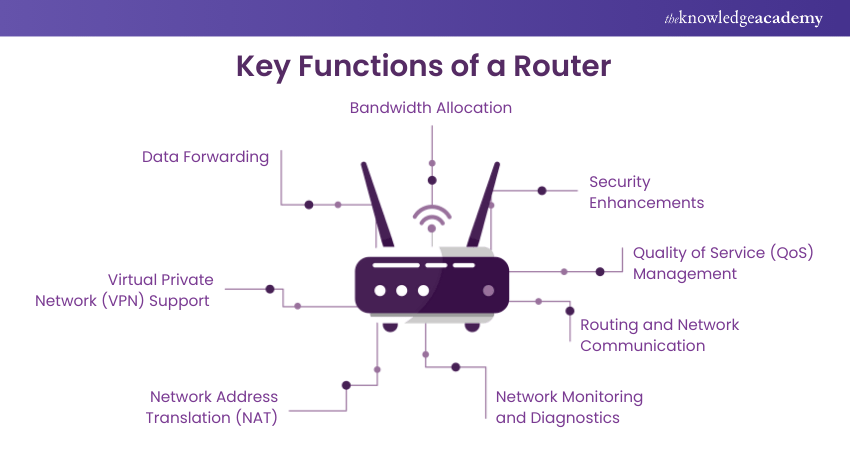
Three Main Functions of a Router
Every router carries out three fundamental tasks: it forwards data packets, filters unwanted traffic, and bridges different networks. Together, these functions allow seamless communication and safeguard network integrity.
Data Packet Routing in Routers
The core function of a router is to forward data packets—small units of information that travel across a network. Each packet has a header containing details such as the source and destination IP address. The router reads this information and determines the best possible path for the packet.
Role of Destination IP Address in Data Packet Routing
Each packet carries a destination IP address. Routers read this information and make quick decisions about where the packet should go next.
Importance of Routing Tables in Routers
Routing tables are the backbone of smooth network communication. Inside every router, these tables act like digital maps, storing predefined paths and rules that guide data packets. Instead of sending information blindly, a router checks its table to pick the shortest, most reliable, and efficient route.
Main Points:
-
Routing tables act as decision-makers for data paths.
-
They ensure packets avoid delays and reach the correct destination.
-
They improve both speed and reliability in networks.
Without routing tables, routers would struggle to deliver accurate data, leading to slow connections, dropped packets, and even security risks. In today’s connected world, efficient routing tables are not just useful—they’re essential for both home and enterprise networks.
Significance of Efficient Data Packet Routing
Efficient data packet routing plays a key role in ensuring fast, reliable, and congestion-free connectivity for users and businesses worldwide.
Efficient data packet routing is the backbone of smooth digital communication. By directing internet traffic through the shortest and most reliable paths, it guarantees faster speeds, minimal congestion, and improved stability.
The main points include:
-
Boosted internet speed for users.
-
Reduced network congestion, keeping traffic flowing.
-
Stable connections crucial for streaming, gaming, and enterprise workloads.
In today’s digital landscape, poor routing can disrupt business operations, cause delays in cloud applications, and frustrate gamers and streamers. On the other hand, efficient routing not only improves user experience but also supports large-scale enterprise systems that demand high uptime.
Data Switches vs Routers: A Clear Comparison
Comparison Table:
| Feature | Data Switch | Router |
|---|---|---|
| Primary Function | Connects multiple devices within the same network (LAN) | Connects different networks (LAN to WAN or multiple LANs) |
| Addressing | Uses MAC addresses to send data within the network | Uses IP addresses and routing tables to determine paths |
| Traffic Management | Manages internal network traffic efficiently | Determines best paths for data across networks |
| Security Features | Limited, mainly VLANs | Advanced, including firewalls, NAT, and access control |
| Internet Access | Cannot provide direct internet access | Provides internet connection and external network communication |
| Best Use Case | Office or home networks to connect computers, printers, servers | Home or enterprise networks to connect LANs to the internet or other networks |
Ensuring Accurate Data Delivery Across Networks
Reliable Protocols for Data Accuracy
Accurate delivery begins with TCP (Transmission Control Protocol), which ensures data packets arrive in the correct order and without errors.
-
Sequence Numbers: Keep packets in proper order.
-
Sliding Window System: Manages flow to avoid overload.
-
Retransmissions: Lost or corrupted packets are resent.
Network Management & Optimization
Stable connectivity relies on proper performance management:
-
Bandwidth Optimization: Efficiently allocates data flow.
-
Traffic Shaping: Prevents congestion by controlling data rates.
-
Load Balancing: Distributes traffic across multiple servers.
-
Regular Maintenance & Hardware Checks: Keeps routers, switches, and links functioning at peak performance.
Security Measures for Safe Delivery
Security is key to maintaining trust in networks:
-
Data Encryption: Protects information during transmission.
-
Access Control: Restricts unauthorized users.
-
Security Audits: Identifies vulnerabilities and ensures compliance.
Other Supporting Factors
-
IP Protocol: Works with TCP to route packets correctly.
-
CDNs (Content Delivery Networks): Enhance performance by spreading content across multiple servers.
Main Points Recap:
-
TCP ensures order, reliability, and retransmission.
-
Bandwidth optimization, traffic shaping, and load balancing improve performance.
-
Encryption, audits, and access control secure transmissions.
-
IP and CDNs strengthen delivery speed and accuracy.
Network Address Filtering in Routers
Filtering adds a layer of protection. Routers decide what traffic can pass through based on IP addresses, ports, and protocols.
Filtering Incoming Traffic with Routers
By blocking suspicious traffic at the entry point, routers protect devices from malware and hackers.
Criteria for Filtering Network Traffic
Network traffic filtering is a process that examines and controls data packets moving across a network based on predefined rules. Instead of allowing all traffic freely, filters decide what should be permitted or denied. This not only strengthens cybersecurity but also improves performance and compliance with organizational policies.
Common Filtering Criteria
-
IP Addresses: Filters traffic based on source or destination IPs, ranges, or subnets.
-
Port Numbers: Controls traffic tied to specific services, e.g., port 80 (HTTP) or port 443 (HTTPS).
-
Protocols: Inspects communication types like TCP, UDP, or ICMP.
-
Layer 7 Application Filtering: Goes beyond ports, identifying traffic by application (e.g., social media or web browser).
-
URLs: Blocks or allows access to certain web addresses.
-
HTTP Methods & MIME Types: Filters based on HTTP requests (GET, POST) or content types.
Main Goals of Traffic Filtering
-
Security & Threat Detection: Stops malicious packets, unauthorized access, and abnormal patterns.
-
Access Control: Restricts usage of specific resources or categories.
-
Performance Optimization: Prioritizes essential traffic to boost network speed.
-
Compliance: Ensures rules match industry and legal requirements.
-
Network Visibility: Offers clearer insights into traffic by removing unnecessary data.
In short, network filtering isn’t just about blocking or allowing traffic—it’s about securing digital infrastructure, improving efficiency, and keeping data safe while maintaining visibility over what’s happening inside the network.
Security Benefits of Network Address Filtering
-
Cost Savings: Organizations don’t need unique IPs for every device, reducing expenses.
-
IP Address Conservation: NAT overload maximizes IPv4 usage, keeping private intranets functional.
-
Connection Flexibility: Features like load balancing and backup improve reliability.
-
Consistent Addressing: Provides stable schemes for growing networks.
-
Enhanced Security: Hides internal source addresses, reducing exposure to attacks.
-
Private Addressing: Internal systems remain intact even if ISPs change.
Main Challenges of NAT
-
Performance Issues: Packet inspection and translation may slow down traffic.
-
Application Compatibility: Some apps relying on end-to-end connections may not work smoothly.
-
Protocol Limitations: Protocols like IPsec can face conflicts due to header changes.
-
Service Instability: TCP/UDP services may suffer disruptions without proper configuration.
-
High Memory Usage: Constant translation consumes processor and memory resources.
-
Troubleshooting Difficulty: Frequent address changes complicate tracing and diagnostics.
Protecting Against Unauthorized Access with Routers
Modern routers use firewalls, encryption, and access rules to ensure only trusted devices can connect.
Blocking Malicious Traffic through Routers
Routers detect unusual activity, such as Distributed Denial of Service (DDoS) attempts, and block harmful data before it enters the network.
Routers as Intermediaries Between Networks
Routers link multiple networks, such as local (LAN) and external (WAN), ensuring global communication.
LAN and WAN Connections in Routers
A LAN connects home devices, while WAN connects the LAN to the wider internet. Routers bridge both seamlessly.
Connecting Local Devices to the Internet
By linking phones, laptops, and IoT devices, routers distribute internet from the modem across all household or office devices.
Routers as Gateways Between Private and Public Networks
Routers act as protective gateways, allowing private networks to safely access public internet resources.
Difference Between Routing and Switching
Switching connects devices within the same network, while routing connects different networks together.
Consequences of Routing Failures in Data Transmission
Main Disadvantages of NAT
-
Performance Overhead:
NAT inspects and translates every packet, which can slow down real-time communication. In scenarios with heavy traffic or strict security checks, this delay becomes more noticeable. -
Application Compatibility Issues:
Some applications relying on direct end-to-end connections may not function properly under NAT. Internal hosts can also become unreachable, creating disruptions for users. -
Protocol Limitations:
NAT modifies packet headers, which interferes with tunneling protocols like IPsec. Integrity checks may fail, making secure connections harder to establish. -
Service Instability:
Protocols such as TCP and UDP often experience inconsistencies when passing through NAT. Incoming packets may fail to reach their intended destination unless the router is carefully configured. -
High Memory Usage:
Since NAT must track translation details of both incoming and outgoing packets, it consumes processor resources and memory, especially in large-scale networks. -
Troubleshooting Difficulties:
With IP addresses constantly changing during translation, tracking data flow becomes complex. This reduces end-to-end visibility and makes diagnosing network problems more time-consuming.
Modern Routers with Integrated Routing, Filtering, and Security Features
Today’s routers are all-in-one devices. They include advanced features like VPN support, WPA3 encryption, parental controls, and AI-based traffic optimization.


